SOURCE CHECKED
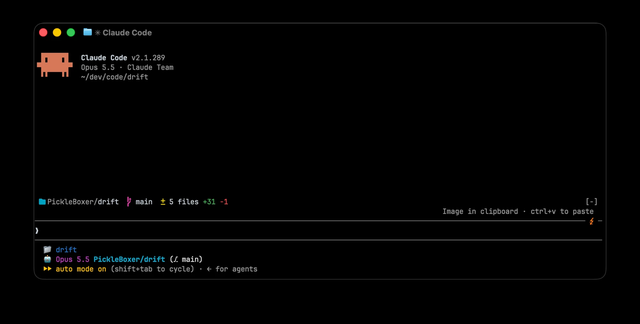
drift
Keep your current folder, Git branch and working tree changes above the prompt.
WorkflowPickleBoxer
Discover Git status panels, code review helpers, CI tools and workflow automation for Claude Code.
3 mods to make your workflow better
Keep your current folder, Git branch and working tree changes above the prompt.

Keep the goal, current task and next step visible in a concise status band.
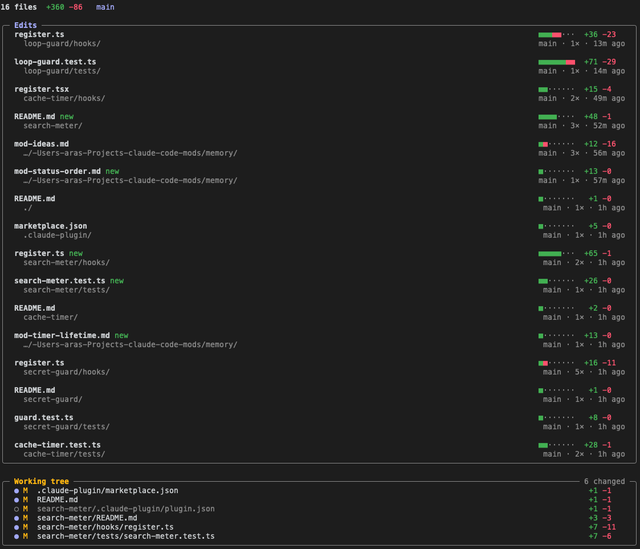
Browse files edited during the session alongside working tree changes.
Share your work with the Claude Code community. Submissions are reviewed before listing.
Get started with Claude Code mods
explained: learn how function hooks, plugins, custom panels and interface events extend Claude Code.
installation guide: add a plugin marketplace, install a mod, check compatibility and troubleshoot function hooks.
developer guide: understand plugin manifests, register hooks, ui.render, custom panes and distribution.
safety guide: inspect function hooks, file access, network calls and tool interception before loading a mod.
Mods are plugins implemented with JavaScript or TypeScript function hooks. They can respond to Claude Code events and customize its interface or behavior. Learn how mods work.
Follow the maintainer’s README to add the correct plugin marketplace and install the named plugin. Check dependencies and version requirements first. Read the installation guide.
Source checked means we confirmed a plugin manifest and recognizable function-hook source. It does not mean runtime testing or a security audit. Review the project before installing it.
Yes. Share a public source repository, a clear description and its category through the submission form. It will enter the review queue.